What rebuilding my website taught me about reducing Codex usage, avoiding unnecessary iterations, and getting more work done.
When I started rebuilding MartinGram.com with OpenAI Codex, I thought I was taking a shortcut.
I started in the afternoon, expecting to have the website updated and my next field note published by that evening. After all, I had AI doing the heavy lifting.
But I was wrong.
Instead of spending days manually editing WordPress templates, CSS, and various website elements, I could simply describe what I wanted and let Codex handle the technical work.
And it worked.
I could change layouts, typography, navigation, and functionality without writing every line of code myself.
The problem wasn’t that Codex couldn’t do the work. It was that I became fascinated by how easily I could change things.
One adjustment led to another. Something that looked good on desktop needed fixing on mobile. A change to one element affected another. And occasionally, I would decide that the original idea wasn’t quite what I wanted after all.
What I initially thought would take half a day turned into nearly six days of work.
Along the way, I discovered something else: I could burn through an entire five-hour Codex usage allowance in as little as ten minutes.
And yes, I was using the $20-a-month ChatGPT Plus subscription.
I wrote about that experience in The Website That Ate My AI Credits.
But the experience also made me curious.
Was Codex really that expensive to use, or was I simply using it inefficiently?
The answer, I suspect, was a combination of both. But there were several things I could control.
And some surprisingly small changes in how I approached the work made a considerable difference.
1. The Problem Wasn’t Always the Size of the Task
One of the first things I noticed was that the apparent simplicity of a task didn’t necessarily correspond to how much Codex usage it consumed.
Changing the spacing between two elements sounds trivial.
But depending on how the task is approached, Codex might need to inspect multiple files, trace CSS rules, investigate responsive layouts, make changes, and verify the result.
And if the result isn’t quite right, the process starts again.
During the website rebuild, I often found myself working through several iterations of what was essentially the same problem.
Sometimes that was necessary.
Other times, I was experimenting with design choices rather than solving actual technical problems.
That’s an important distinction.
When you’re working with a traditional developer, every additional request has an obvious cost in time or money. When you’re working with AI, the next change feels almost free.
You type another instruction and watch it happen.
But the underlying computational work isn’t free, and neither is the time spent reviewing the results.
I hadn’t eliminated the cost of development. I had changed the way that cost appeared.
2. Give Codex a Specific Job
One of the most useful changes was becoming more deliberate about the scope of each task.
Consider two ways of approaching the same problem.
The open-ended approach:
“Take a look at the mobile layout and fix the spacing problems.”
This gives Codex considerable freedom to investigate the website, interpret what might be wrong, and decide what to change.
Sometimes that’s exactly what you want.
But if you already know which element needs adjusting, you’re potentially asking Codex to perform a much broader investigation than necessary.
A more focused approach:
“On the mobile version of the article template, the spacing below the heading is too large. Identify the CSS rule responsible, adjust only that spacing, and preserve the desktop layout. Verify the mobile result and summarize the change.”
The second instruction defines a much narrower problem.
It identifies the outcome, limits the scope, and establishes what should remain unchanged.
It also makes it easier to judge whether the task has been completed.
The principle is simple: don’t ask an AI coding agent to investigate your entire website when you already know where the problem is.
Of course, this only works when you know what you’re trying to fix.
When the cause is unclear, investigation becomes a legitimate task in itself.
3. Separate Investigation From Implementation
There is a difference between asking Codex to understand a problem and asking it to change something.
During a website rebuild, those activities can easily become mixed together.
You notice something that looks wrong. Codex investigates, finds a possible explanation, makes an adjustment, checks the result, and perhaps tries another approach.
Before long, a seemingly minor issue has become an extended development session.
For problems where the cause isn’t obvious, I would now consider separating the work into two stages.
First, ask Codex to investigate:
“Identify the cause of the mobile layout issue. Do not modify any files. Explain what is happening and recommend the smallest necessary change.”
Then review the findings.
If the diagnosis makes sense, authorize the fix.
This won’t automatically reduce usage in every situation. A separate investigation also consumes resources. For straightforward problems, it may be more efficient to combine diagnosis and implementation.
But when the cause is uncertain, separating the two can prevent unnecessary changes and repeated attempts to fix the wrong thing.
It also keeps you involved in decisions that might otherwise be made by the agent.
4. Make Your Decisions Before Asking Codex to Execute Them
One of the reasons the MartinGram rebuild expanded was that I wasn’t simply implementing a finished design.
I was discovering the design while building it.
I would try a layout, see how it looked, and decide to change something.
Sometimes the new version was better. Sometimes I preferred the earlier version.
Codex made these experiments remarkably easy.
That was both its greatest advantage and one of the reasons the project took so long.
The more I worked with it, the more I began to recognize the value of making certain decisions before implementation.
What should the page look like?
Which elements need to change?
What should stay untouched?
How will I know when the result is good enough?
Having those answers doesn’t mean eliminating experimentation. Some creative decisions can only be made once you see the result.
But there is a difference between deliberate experimentation and an endless series of adjustments without a clear destination.
If I were rebuilding MartinGram from scratch again, I would spend more time establishing the design direction, page structure, and boundaries before asking Codex to implement them.
Not because Codex can’t help with those decisions.
But because changing your mind repeatedly can become one of the most expensive parts of working with an AI coding agent.
5. Long Conversations Aren’t Necessarily Better Conversations
Another thing I became more conscious of was the amount of context accumulating during extended development sessions.
A conversation that starts with a simple layout adjustment can eventually contain dozens of instructions, code changes, investigations, corrections, and design decisions.
Codex needs sufficient context to understand the task and the project.
But not every piece of information from an earlier conversation is relevant to the next job.
Long-running sessions can become increasingly complicated, particularly when the work shifts between unrelated parts of a website.
The answer isn’t necessarily to start a new conversation for every tiny change.
Doing that can mean repeatedly explaining the same project and losing useful context.
Instead, I would distinguish between the information Codex needs consistently and the information relevant to the current task.
For example, a reusable project instruction file can establish coding conventions, important constraints, and the structure of the website.
Codex supports an AGENTS.md file for this kind of project guidance.
That allows you to preserve important instructions without depending entirely on the history of one increasingly long conversation.
There is a balance here. Excessively detailed project instructions can themselves create unnecessary context.
The objective isn’t to give Codex as much information as possible.
It’s to give it the information necessary to complete the current job correctly.
6. One Small Task Changed How I Looked at Codex Usage
After the website rebuild, I worked on a much smaller project.
I wanted to improve the internal linking between several existing MartinGram articles.
The task involved four links, including a short contextual paragraph in one article.
Rather than treating it as another broad website improvement project, we identified the pages, anchor text, and destinations in advance.
The assignment had a defined result.
Codex didn’t need to redesign anything, explore unrelated problems, or decide what the editorial structure should be.
It needed to make the agreed changes and verify that they were saved correctly.
The task was completed, and all four links were live in WordPress.
What interested me was the usage reading afterward.
Approximately 87% of my five-hour Codex allowance remained.
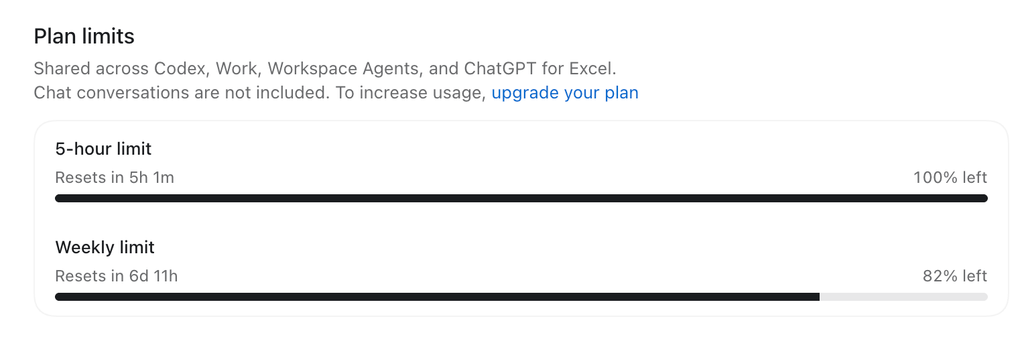
Caption: Codex usage after completing a defined internal-linking task involving four links across existing MartinGram articles.
Compare that with the website rebuild, where I had sometimes exhausted the entire five-hour allowance in minutes.
Now, this wasn’t a controlled experiment.
Updating four internal links is obviously much less demanding than rebuilding a website. I can’t claim the difference was entirely the result of better prompting or task management.
But it illustrated something important.
A clear assignment with a defined endpoint made it much easier to control the work.
There was no ambiguity about what needed to be delivered.
And perhaps more importantly, no reason to keep working once it was finished.
7. My Codex Workflow Now Starts With Five Questions
The most practical lesson I took from the experience was to approach Codex tasks with a simple checklist.
What exactly am I trying to accomplish?
Describe the desired result rather than giving Codex an unnecessarily broad assignment.
What information does Codex actually need?
Identify the relevant pages, files, components, and constraints. Avoid turning every task into a full project review.
Is this an investigation or an implementation?
If the cause is unknown, investigate first when appropriate. If the solution is already clear, implement it.
How will I verify the result?
Decide what successful completion looks like. It might be a passing test, a corrected mobile layout, or four working internal links.
When is the task finished?
Without a stopping point, there is always another improvement to make.
My preferred workflow is now:
Define → Scope → Execute → Verify → Close.
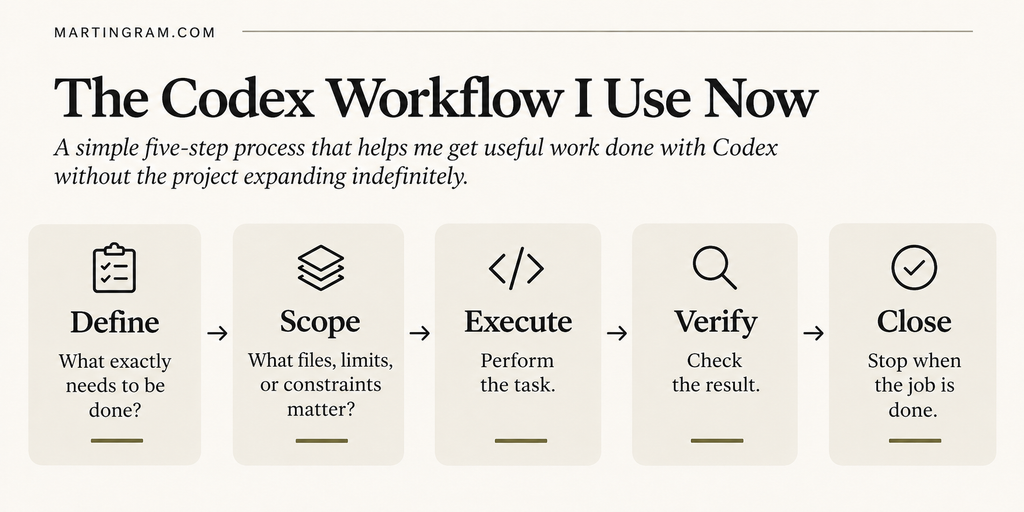
It isn’t a sophisticated development methodology.
That’s partly why I like it.
It introduces just enough structure to prevent an AI coding session from expanding indefinitely.
8. Don’t Use the Most Expensive Approach for Every Problem
There is another practical consideration: not every task needs the same level of AI capability or reasoning.
Codex usage depends on factors including the model, task complexity, context, and how much work the agent performs.
A complicated debugging problem and a straightforward text adjustment are fundamentally different assignments.
Where different models or reasoning settings are available, it’s worth choosing them deliberately rather than assuming every problem requires the most capable option.
But I wouldn’t automatically select the cheapest model either.
A less capable model that repeatedly fails, misunderstands instructions, or creates additional corrections can be more expensive overall.
The relevant question isn’t simply how much a single request consumes.
It’s how much work is required to reach a correct, usable result.
And sometimes, the most efficient decision is not to use Codex at all.
If a change can be made safely in the WordPress editor in thirty seconds, there may be little reason to launch an AI-assisted coding task.
AI should reduce unnecessary work, not become an obligatory intermediary for every small action.
9. Why Didn’t I Just Upgrade to ChatGPT Pro?
At this point, you might reasonably ask why I didn’t simply upgrade from my $20 ChatGPT Plus subscription to Pro and get a larger usage allowance.
It’s a fair question.
If Codex is saving you hours of development work every day, paying more for additional capacity might be an excellent business decision.
But I wasn’t entirely convinced that my problem was a lack of capacity.
During the MartinGram rebuild, I wasn’t always running into usage limits because I was doing essential development work. Sometimes I was experimenting, revisiting earlier decisions, or making adjustments that weren’t particularly important.
Would a Pro subscription have helped?
Absolutely. It would have given me more room to work.
But it wouldn’t necessarily have made me more efficient.
I could just as easily have spent those additional resources experimenting with another layout, another design variation, or another change that didn’t really need to be made.
And there is a financial consideration.
My Plus subscription costs $20 per month. Upgrading to Pro represents a larger recurring expense. For someone managing several websites and independent projects, that’s another cost that needs to justify itself.
I wouldn’t hesitate to upgrade if the additional capacity consistently translated into more completed work, time saved, or revenue generated.
But first, I wanted to understand whether I was making good use of what I already had.
There are also alternatives to upgrading, including purchasing additional usage credits when available.
The question isn’t whether Plus or Pro is better.
It’s whether you’re genuinely running out of capacity because you’re doing valuable work, or because your workflow is consuming more resources than necessary.
More capacity can remove a bottleneck. It doesn’t automatically fix an inefficient workflow.
10. Saving Credits Isn’t the Same as Being Productive
There is a temptation to make Codex efficiency entirely about tokens, credits, or usage percentages.
I think that misses the larger point.
If an AI agent completes several hours of meaningful development work in twenty minutes, relatively high usage might be perfectly justified.
Conversely, spending very little on a task that produces no useful result isn’t efficient.
The objective should be to evaluate the work accomplished against the resources consumed.
Those resources include AI usage, your time, and the cost of correcting mistakes.
During the MartinGram rebuild, I wasn’t only spending Codex allowance.
I was spending attention.
I had articles to publish, other websites to work on, and creative projects waiting for me.
Every additional hour spent adjusting the website was an hour unavailable for something else.
That’s why the most important improvement wasn’t discovering a clever prompt that magically reduced token consumption.
It was becoming more deliberate about what deserved my attention in the first place.
11. The Most Valuable Skill Might Be Knowing When to Stop
I don’t regret rebuilding MartinGram with Codex.
I learned an enormous amount about AI-assisted development, website architecture, and the relationship between human decisions and automated execution.
I also ended up with a website that better reflects what I want MartinGram to become.
But I would approach the same project differently today.
I would define the intended result more clearly, separate necessary fixes from design experiments, establish better boundaries around individual tasks, and be more disciplined about closing work that was already good enough.
I would still experiment.
That’s one of the reasons these tools are so interesting.
But I would be more selective about which experiments were worth pursuing.
Because there is a strange contradiction at the center of AI-assisted development.
The easier it becomes to change something, the harder it can become to stop changing it.
And no amount of additional computing power will make that decision for you.
The most effective way to save Codex credits may not be a particular model, setting, or prompting trick.
It may simply be learning to recognize when the work is finished.
This article follows The Website That Ate My AI Credits, where I wrote about how a supposedly quick website rebuild turned into a much larger project. For another perspective on the relationship between technology and human thinking, see Prompting Didn’t Start With ChatGPT.
Pingback: The Return of Friction - Martin Gram